LIS 568 Review - ScratchJr
Using ScratchJr in the School Library: A Fun Introduction to Coding
In today's digital world, coding is quickly becoming an essential skill, even for our youngest learners. As a future school librarian, I am of course looking for ways to incorporate engaging, educational technology into the library space. ScratchJr is a free app designed to introduce children ages 5-7 to coding through creative storytelling and interactive play.
What is ScratchJr?
ScratchJr is a simplified, block-based programming language that allows young learners to create their own animated stories and interactive games. Using a visual interface, students piece together coding blocks to make characters move, jump, dance, respond to user input, etc. Unlike its more advanced counterpart, Scratch, ScratchJr does not require reading skills, making it a great introduction to computational thinking for early learners.
Why Use ScratchJr in the School Library?
It Encourages Creativity – Students can create their own digital stories, designing backgrounds, characters, and animations.
It Supports Early Literacy – While ScratchJr doesn’t require reading, it helps build storytelling skills, sequencing abilities, and logical thinking, all of which support literacy development.
It Introduces Computational Thinking – Even at a young age, students begin to understand the basics of algorithms, loops, and problem-solving through play.
It Promotes Collaboration – ScratchJr projects can be done in pairs or small groups, encouraging students to communicate, plan, and troubleshoot together.
It Is Accessible and User-Friendly – Since it’s a free app available on tablets and Chromebooks, libraries can easily implement it without expensive equipment or software.
Potential Cons of Using ScratchJr
While ScratchJr has many benefits, there are some challenges to consider:
Limited Complexity: Because ScratchJr is designed for young children, it lacks some of the more advanced features found in Scratch. Older or more advanced students may outgrow it quickly.
Device Dependence: ScratchJr is only available on tablets and certain Chromebooks, meaning students without access to these devices at home may have limited opportunities to practice.
Potential Screen Time Concerns: While ScratchJr is educational, it still involves screen time, which may be a concern for some educators and parents.
How to Incorporate ScratchJr into the School Library
Here are a few ideas on how school librarians can use ScratchJr to engage students:
Coding Storytime: Pair a read-aloud session with a ScratchJr activity where students create an animation inspired by the story.
Digital Storytelling Workshops: Guide students in designing their own animated short stories using ScratchJr, helping them develop narrative skills while learning basic coding.
STEM Stations: Set up a library makerspace station where students can explore ScratchJr independently or in small groups during free time.
Themed Challenges: Give students prompts like “Create a story about a character going on an adventure” or “Make an interactive birthday card,” encouraging creativity and problem-solving.
Final Thoughts
I love ScratchJr because it makes coding accessible, engaging, and developmentally appropriate for young learners. By integrating it into the school library, we provide students with the opportunity to experiment with technology in a safe, playful environment. More importantly, it helps lay the foundation for computational thinking skills that will serve them well in the future.
While there are some limitations to ScratchJr, I believe its benefits far outweigh the drawbacks, especially as a tool for introducing young children to coding in a fun and creative way.
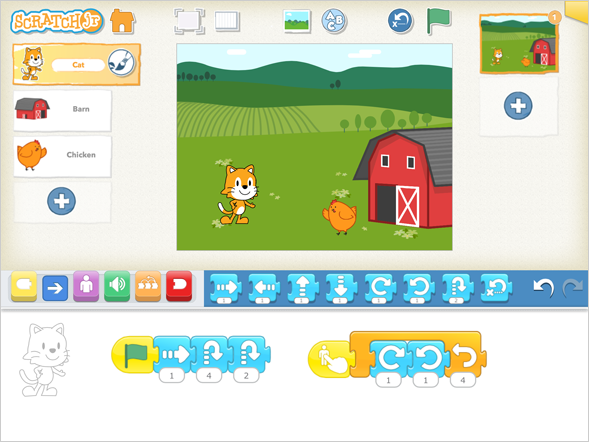
see video from ScratchJr site!


Comments
Post a Comment